
Your website
Add a clear link beside the information your representative helps explain. If you want to embed the page, check that your website supports the embed and test it in your chosen location.
ASK THE AGENT
Your representative's public page gives people a conversational way to explore your expertise, services and perspective. Share a clear invitation wherever your audience already connects with you.
Tell people which services, questions or expertise they can explore.
Review your hosted page and check compatibility before website embedding.
Choose current resources and contact links that fit the visitor's needs.
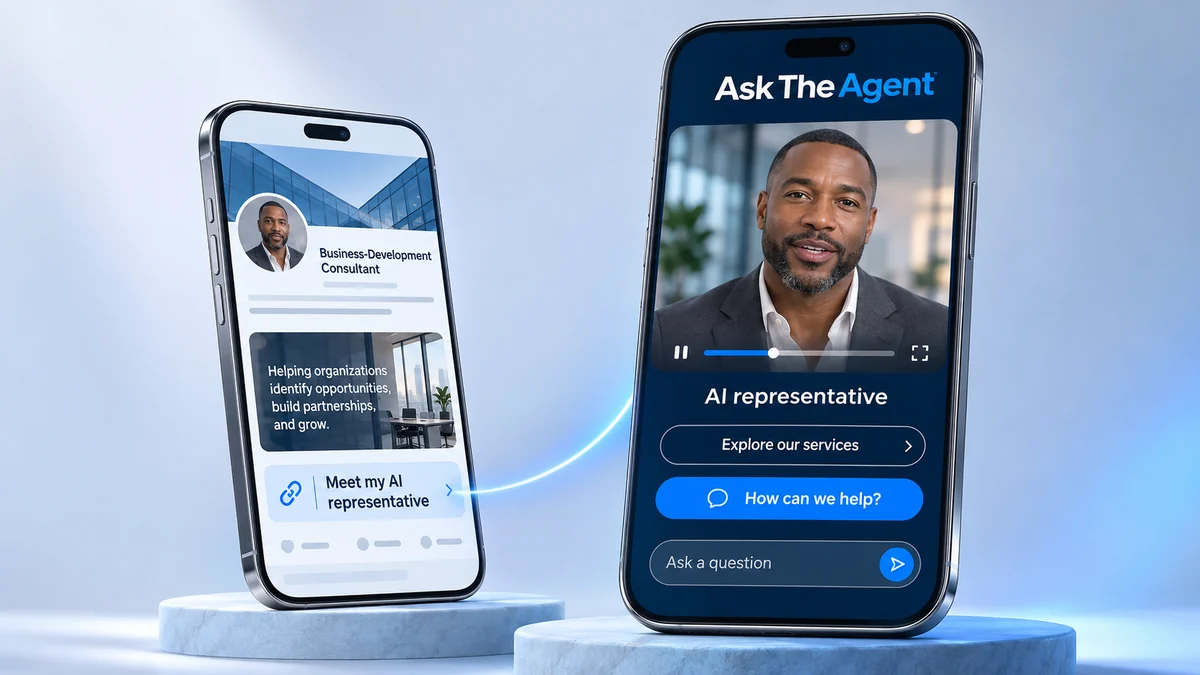
YOUR PRESENCE, CONNECTED
START WITH A CLEAR INVITATION
Introduce your ATA as your AI-powered representative and name a topic visitors can explore, such as 'Explore how my consulting process works.' Place the invitation beside the service, portfolio item or topic it helps explain.
Before sharing, review the representative's biography, suggested questions, knowledge and selected resources. Choose the representative that fits the audience.
Add a clear link beside the information your representative helps explain. If you want to embed the page, check that your website supports the embed and test it in your chosen location.
Share a link to your representative's public page in a social post or email. Pair it with a question or topic relevant to that audience so people know what they can explore when they open the page.
Use a link in a presentation or a QR link that opens the hosted page. Test the destination before you share it, and explain what visitors can explore after the event.
KEEP THE NEXT STEP USEFUL
Choose current contact links and public resources that fit the visitor's interest, and label each destination clearly.
A professional profile or portfolio can explain your background; a service guide can answer a practical question; your existing contact or booking page can help someone continue. You choose the destinations, with appointments and personal replies handled through your own business process.
After sharing, use available conversation insights and the conversational reporting assistant to explore recurring questions, refine your introduction and plan personal follow-up where useful.
BUILT AROUND YOU